About the Windows warning
GoodPDF for Windows is not code-signed yet. SmartScreen builds trust on the signing certificate, and without one it can only judge each file on its own — and every release is a new file. So this warning will not fade over time. It means the file is uncommon, not that anything harmful was found in it.
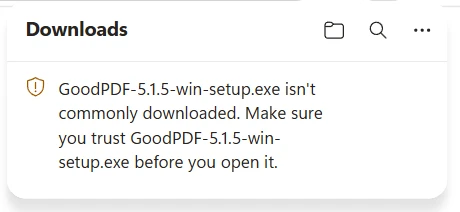
Microsoft Edge shows this in the downloads list. Open the menu on the item and choose Keep.
Google Chrome usually downloads it without a prompt. If it does warn, choose Keep.
Other browsers word it differently, and some say nothing at all. Whatever the wording, pick the option that keeps the file — Keep, Save, or Continue.
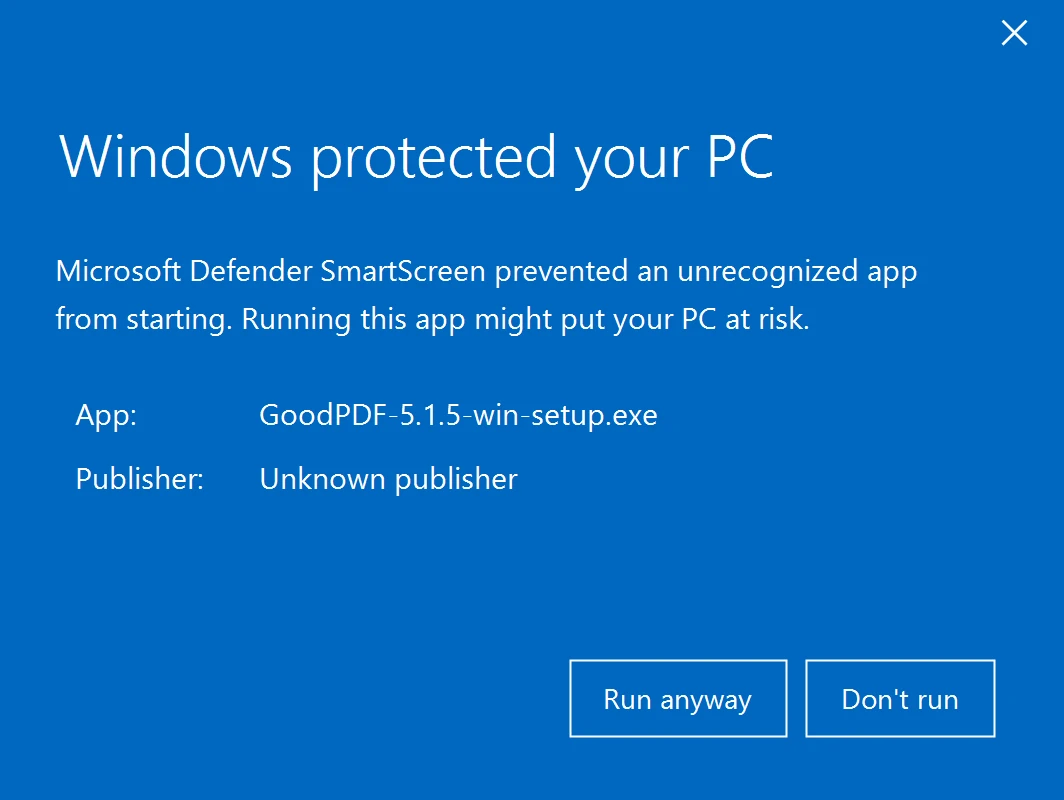
When you open the installer, Windows shows one more prompt, with the publisher listed as unknown. Choose More info, then Run anyway.
Updates inside the app take a different path: each one is signed with our own key and verified before it installs, without going through the browser.
Installing
- 01
Open
Double-click on the downloaded file
- 02
Launch
Launch GoodPDF Installer from the Downloads folder
- 03
Confirm
Click Open when you see the pop-up message
- 04
Install
Click Install to complete the process
- 01
Open
Double-click the downloaded setup file
- 02
Allow
Windows may warn that the publisher is unknown. Choose More info, then Run anyway
- 03
Install
Setup installs GoodPDF for your account — no administrator password needed
- 04
Run
GoodPDF opens when setup finishes, and stays in your Start menu
Already know it works? See pricing.