01 / 01
Outline Editing
Table of contents is a digital map of your PDF. It quickly guides you to the most important parts of the file.
Try GoodPDF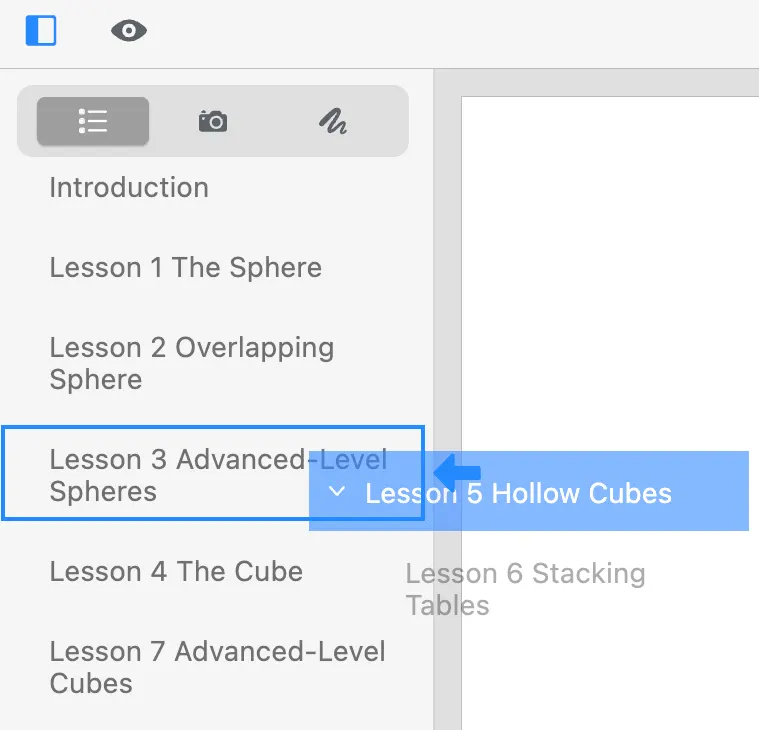
The table of contents is a digital map of your PDF. Edit and reorder outline entries in GoodPDF so readers jump straight to the parts of the file that matter.
01 / 01
Table of contents is a digital map of your PDF. It quickly guides you to the most important parts of the file.
Try GoodPDFA PDF outline, sometimes called the bookmarks or table of contents, serves as the navigational structure embedded inside the file. Each entry in the PDF outline links to a page or a specific section, giving quick access to document sections without manual scrolling. This navigation panel appears in most PDF readers as a sidebar, often opened by default in lengthy or structured documents.
The table of contents is separate from visual content. It is a data structure stored within the PDF itself, containing a list or tree of entries. GoodPDF allows direct access to editing this data. You can add, remove, rename, or reorder bookmark tree entries without altering any page content. Changes in the contents list reflect immediately and persist when the document is saved.
GoodPDF includes a dedicated tool for editing the PDF outline. This tool displays the current outline tree, letting you inspect entries and their links to specific pages. Adjustments to the navigation tree are made locally on your computer; all editing and saving processes happen inside the app’s native engine, without converting your PDF into other formats or sending it elsewhere.
When you modify the table of contents in GoodPDF, the application matches the internal structure used by most mainstream PDF readers. Titles, hierarchy, and jump destinations remain compatible with macOS Preview, Adobe Acrobat, and other industry tools. There is no intermediary step, such as converting the document to a different format or relying on external services for the changes.
Other desktop or online editors may not handle the PDF outline as a native component. Some require converting the PDF to Word or another format, which often strips or distorts the outline entirely. Similarly, browser-based tools might only allow basic editing of visible content, failing to offer direct bookmark tree manipulation. As a result, links may break or disappear on export.
Some applications misalign outline entries after document edits, causing navigation to point to incorrect pages. In others, updates to the contents list are not reflected in popular reader applications. GoodPDF’s approach differs by writing changes directly into the original outline section of the PDF, preserving both structure and compatibility with external viewers.
Suppose you open a document with a corrupted or incomplete PDF outline. With GoodPDF, start by selecting the ‘Outline’ tool from the list of available options. The panel loads the existing navigation tree tree; entries pointing to blank or incorrect pages are easily identified. You can select and edit any item, entering the correct title and setting its destination using the page preview pane.
To add a missing chapter, click ‘Add Entry’ and choose its hierarchy level in the table of contents. Select a target page, optionally typing a custom section name. Move entries up or down to match the logical order of the document. Each change is tracked and, when satisfied, you can save your work. The updated bookmark tree now matches your intended navigation.
With PDFs that lack navigation, GoodPDF lets you construct a PDF outline starting at any location in your document. Load the file, and open the outline editor. Click ‘Add Entry’ to create a root item for the table of contents. For longer works, use child entries to nest subsections beneath main headings, building a complete contents list to mirror your document’s structure.
Each entry you add can be renamed, deleted, or repositioned. The destination for every item is selected using the live page preview, which reduces risk of misdirected links. As you add to the navigation tree, changes remain visible and updatable until you save. This workflow creates a table of contents that is useful across platforms.
GoodPDF processes changes to the PDF outline using the engine inside the application package. Updated bookmarks are written to the same file structure as the original document. The saved bookmark tree is recognized by any major PDF viewer that supports outlines, maintaining navigation entries, nesting, and targets without extra steps.
Edits you make with GoodPDF persist after closing the app or sharing the file. Whether you reorganize the contents list, relabel items, or repair broken links, each change becomes part of the PDF itself. This avoids confusion from incompatible exports or lost navigation, guaranteeing the navigation tree remains accurate and accessible in future use.
A single GoodPDF licence enables access to every PDF outline feature on both macOS 12.5+ and Windows 10 1809+ systems. The interface presents the same outline tree on both platforms, and the engine manages the table of contents identically, producing the same structure across devices and operating systems.
In the free version, every bookmark tree tool is available without an account or registration. You can build, edit, and repair the contents list exactly as you would in the licensed version. Upon purchase, activation is completed with a single key, which removes the watermark from saved files across up to five devices.